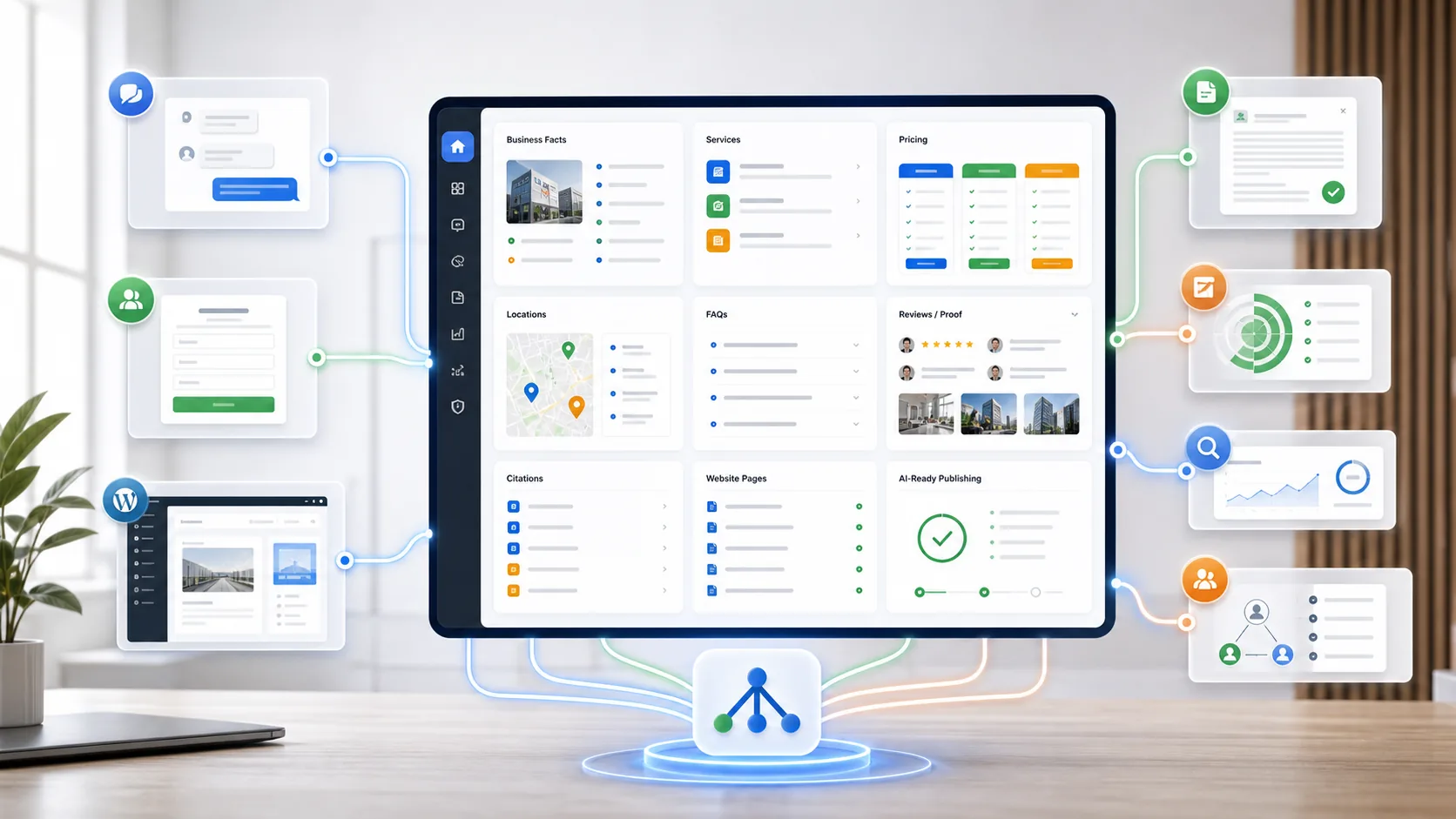
AI Hub gives an SMB one approved place for business facts, AI-ready content, lead capture context, chatbot answers, trust proof, alerts, and follow-up workflows.
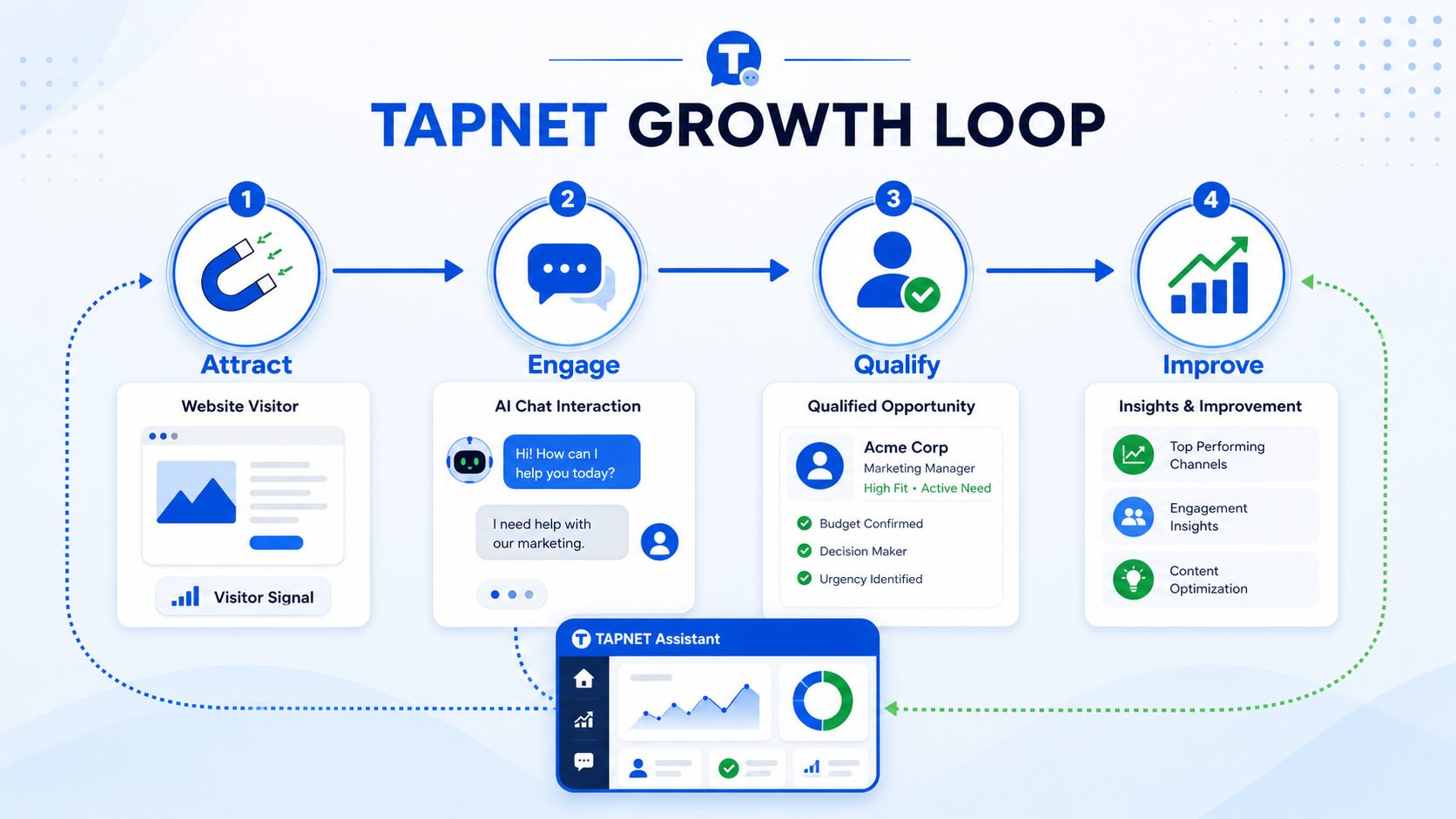
SMB Operating HubCapture website visitorsQualify real intentFollow up fasterPublish approved answersConnect add-ons
Why AI Hub Becomes Essential
Most SMBs do not lose opportunities because they lack another app. They lose them because answers, proof, tools, and follow-up live in separate places.
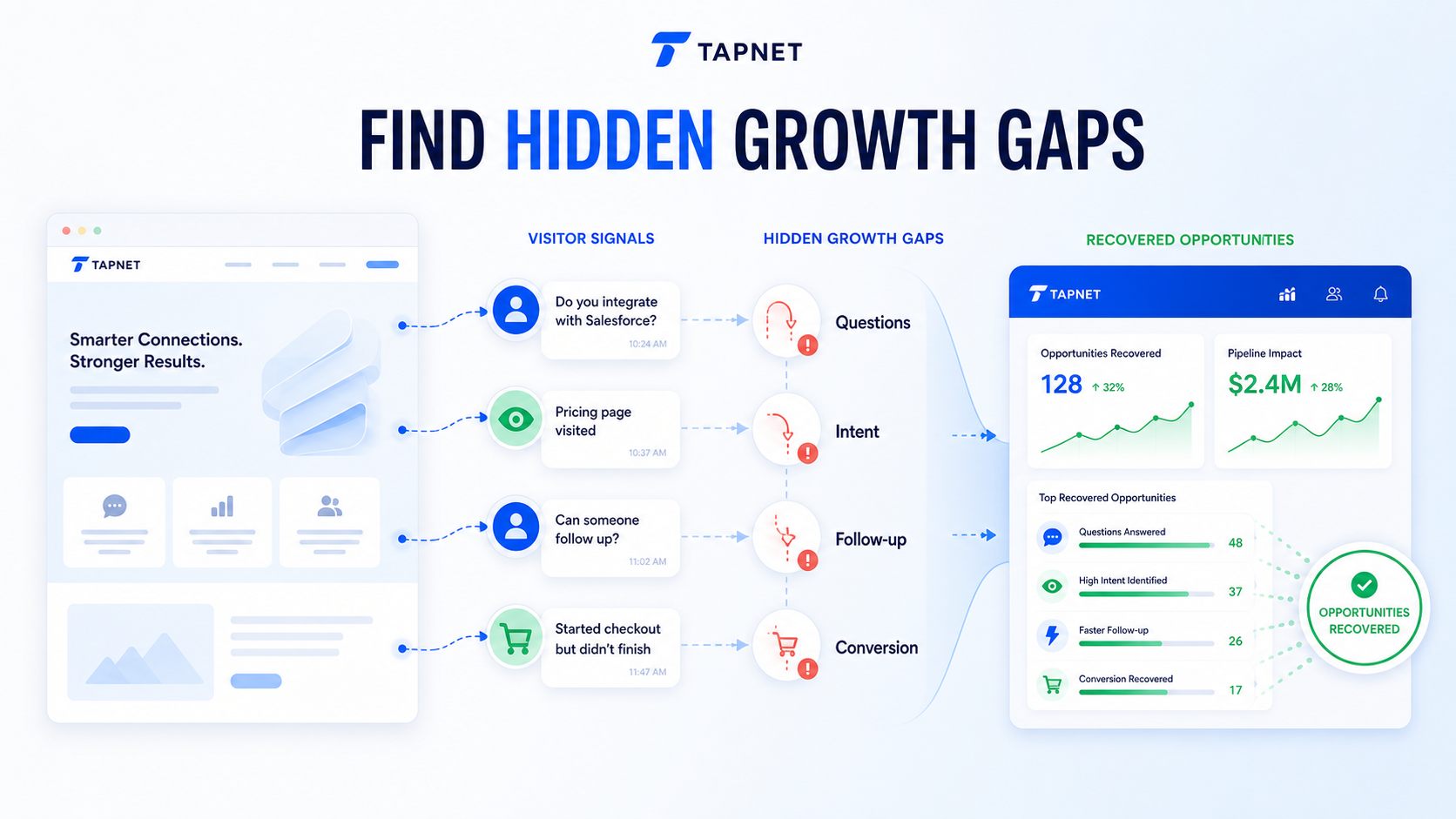
The offer is scatteredServices, pricing factors, locations, proof, policies, FAQs, offers, and next steps live in one approved source.AI and search guess from fragmentsAI Hub publishes first-party business facts so crawlers and answer engines can read the version the business actually approves.Every tool needs setup twiceChatbot, Lead Widget, lead capture, local trust, SEO, alerts, and follow-up workflows can inherit the same Hub knowledge.Leads arrive without contextAI Hub keeps service interest, source, fit, urgency, proof, and contact paths close to the moment a prospect decides to act.
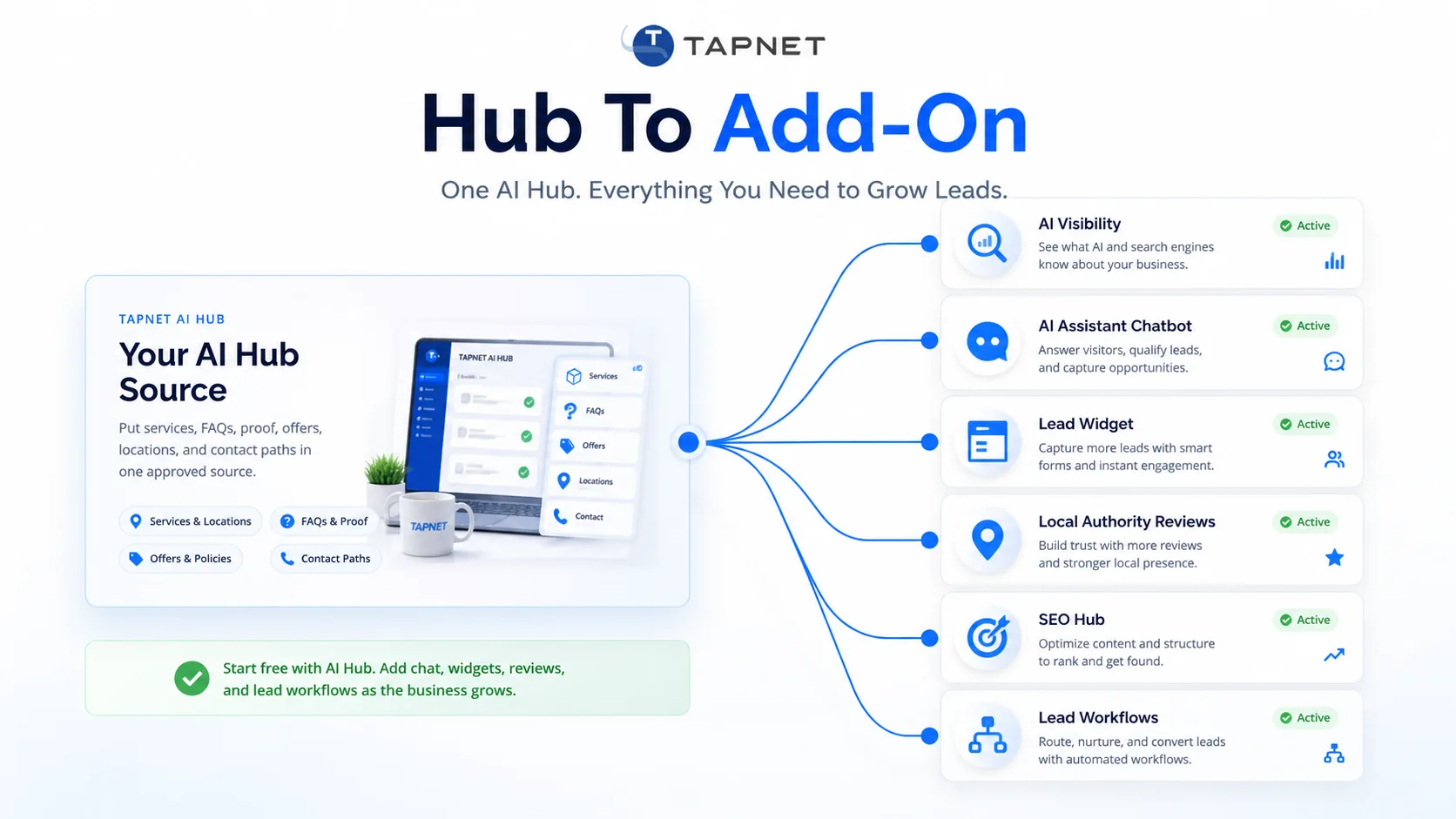
One Hub. Every Lead Tool Connected.
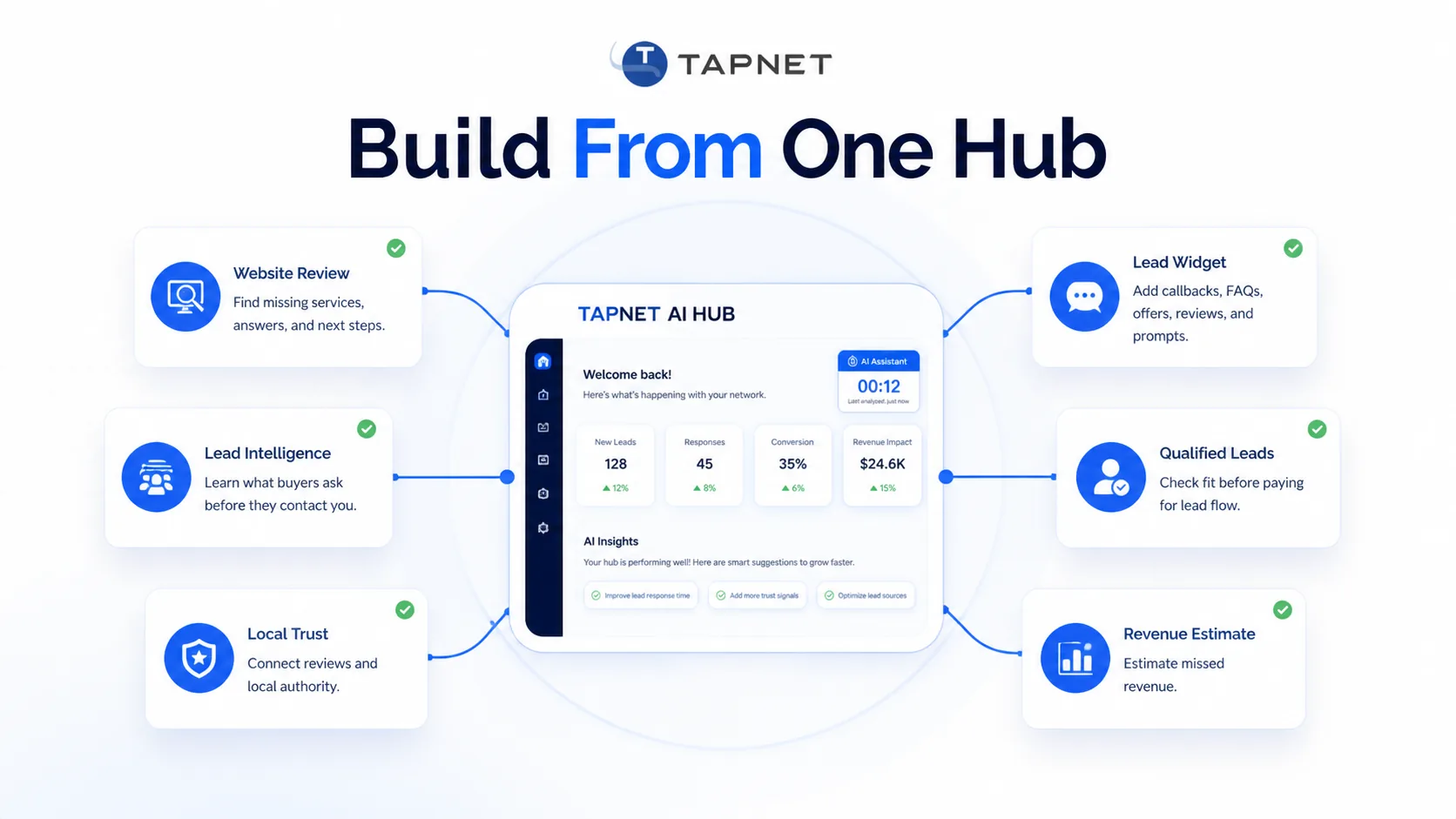
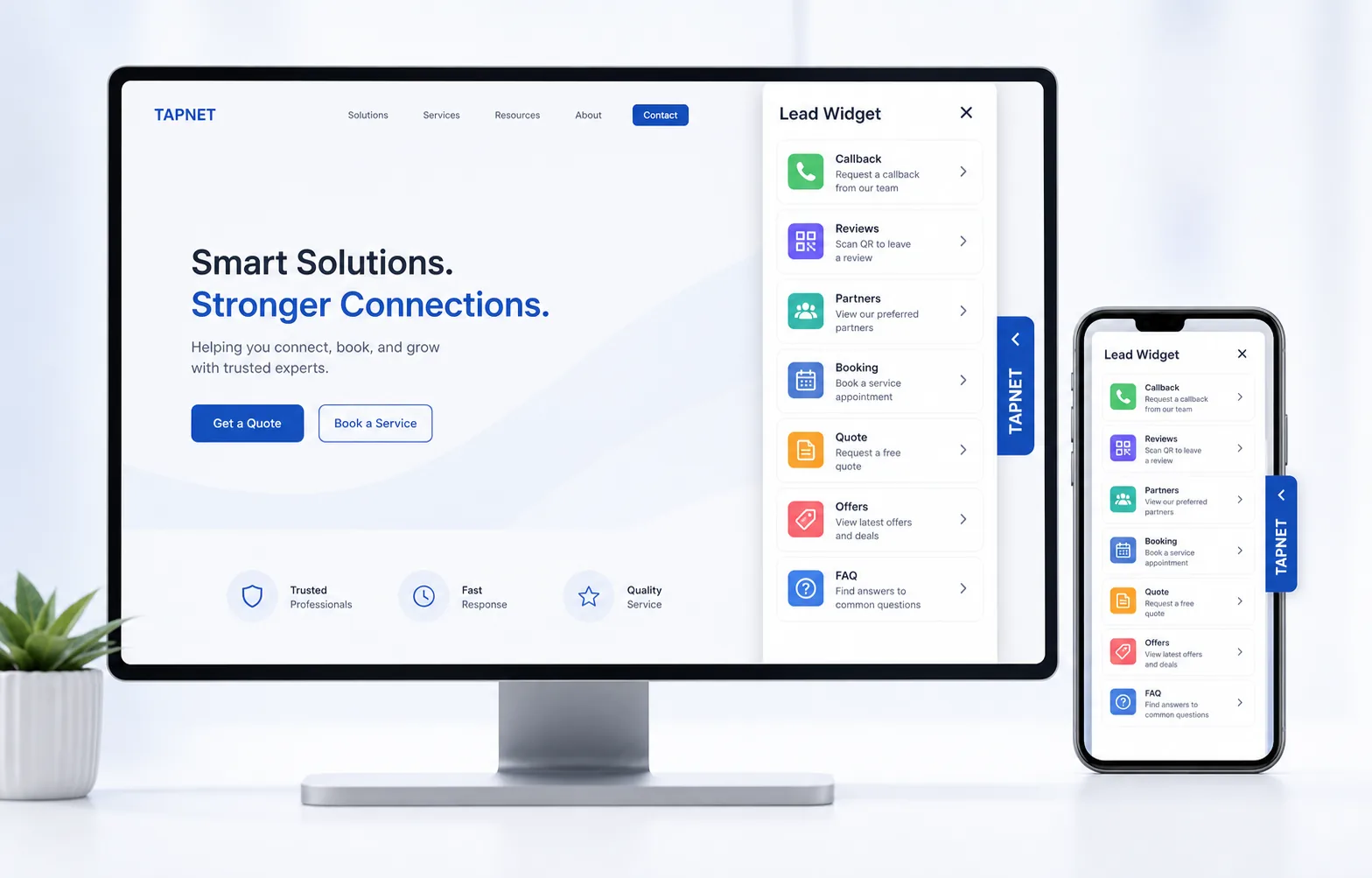
AI Hub is the sourceServices, locations, FAQs, proof, offers, and contact paths are approved once and reused everywhere.AI Assistant answersThe chatbot uses Hub knowledge for visitor questions, next-step guidance, and light qualification.Lead Widget actsWidget prompts reuse Hub facts for callbacks, reviews, offers, service areas, booking, and quotes.SEO Hub grows demandSEO Hub uses the Hub foundation to find keyword, content, and authority work needed for discovery.
The Platform Layer Under Every Growth Tool
AI Hub is the control layer for what the business says, what prospects see, what AI systems can read, and what follow-up receives.
Business Source Of TruthA strong Hub covers the facts visitors, staff, search engines, and AI systems need before lead capture.
Business profile, service promise, and ideal customer fit
Core services, locations, hours, pricing guidance, and next steps
FAQs, reviews, proof, guarantees, certifications, and source links
Phone, email, booking, chat, forms, and response expectations
Crawlable AI ContentAI Hub publishes first-party pages crawlers can reach on TAPNET, WordPress, or a custom site.
Public AI content pages and profile routes
Service and location pages where needed
llms.txt and sitemap-style discovery paths
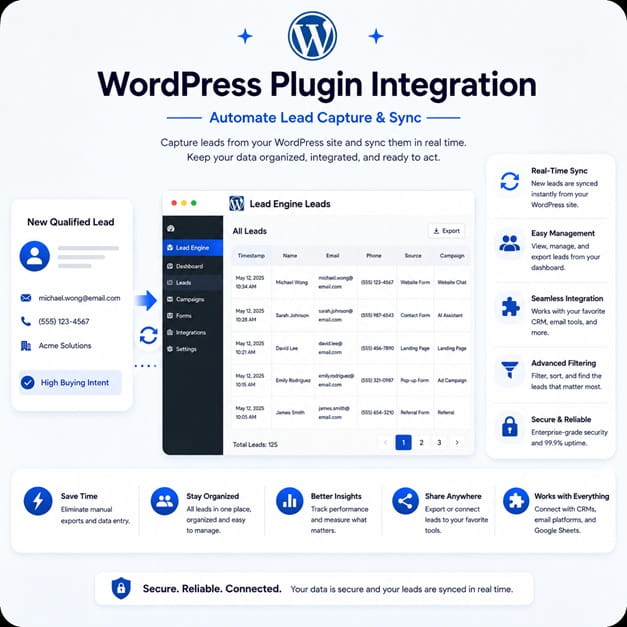
Lead Capture And Follow-UpThe Hub gives lead tools the business context they need before a visitor becomes a follow-up task.
Website chat, forms, widgets, campaigns, and vendor intake
Service interest, source, fit, urgency, and contact readiness
Follow-up context for alerts, CRM handoff, or manual review
What AI Hub Does Not DoAI Hub improves the source of truth, but it does not guarantee rankings, citations, traffic, or sales.
It does not replace SEO Hub, technical SEO, reviews, citations, or authority work
It does not instantly remove stale third-party information
Why SEO Hub Still MattersAI Hub organizes the facts. SEO Hub finds the demand gaps, page gaps, and ranking work required to be discovered.
Keyword, page, indexability, and content-depth checks
SEO Queue or provider marketplace handoff when execution is needed
Add-Ons Run From The HubAI Assistant, Lead Widget, AI Visibility, SEO Hub, reviews, alerts, and lead workflows should inherit the same Hub facts.
One reviewed source reduces duplicate scripts and conflicting copy
Answer the important business questions once. AI Hub stores the reviewed facts that define services, locations, proof, pricing guidance, citations, policies, offers, and response promises.
Crawlable AI Presence
First-party publishing, downloadable pages, llms.txt, sitemap-style discovery, and WordPress routes turn Hub data into facts crawlers and answer engines can actually reach.
Connected Growth Add-ons
AI Assistant, Lead Widget, Lead Intel, SEO Hub, review proof, alerts, and lead workflows use the same source instead of each tool inventing its own version of the business.
Freshness And Review Loop
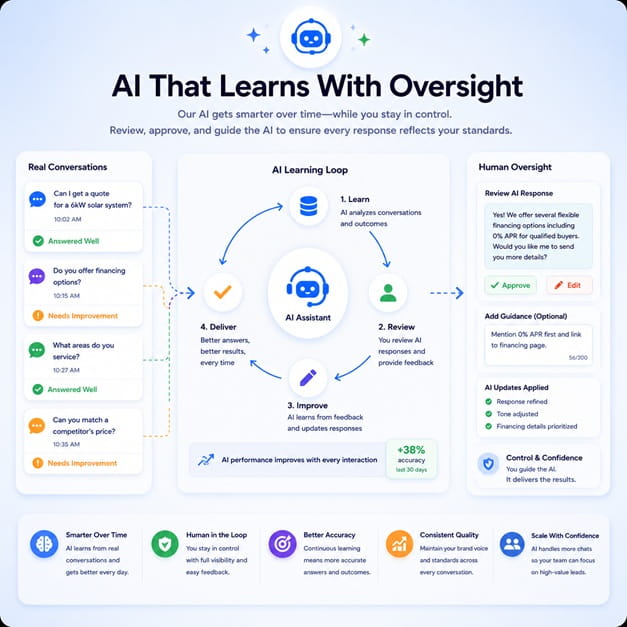
Owners can keep answers current as offers, staff, locations, seasonal services, reviews, and real lead questions change over time.
What The AI Hub Powers Next
AI discovery profileBusiness facts are organized for crawlers, answer engines, and AI-ready publishing routes.Website chatbot answersAI Assistant answers from reviewed Hub knowledge instead of loose, outdated scripts.Lead Widget contentWidget prompts reuse Hub facts for reviews, offers, service areas, booking, quotes, and FAQs.Lead workflowsCaptured inquiries can carry service interest, source, qualification, urgency, and next-step context.SEO Hub handoffDemand, page, and ranking gaps become SEO Hub, SEO Queue, or provider work when discovery is the bottleneck.Business alertsNew questions, missed context, proof gaps, and follow-up signals can point the business back to what needs updating.
AI Hub Rollout Path
1Inventory the businessCapture services, locations, FAQs, proof, pricing guidance, offers, and contact paths.2Fill knowledge gapsUse AI Visibility and question clusters to find missing answers.3Publish approved answersCreate public pages, WordPress routes, downloadable files, and discovery maps.4Attach growth toolsConnect Assistant, Lead Widget, SEO Hub, reviews, alerts, CRM handoff, or lead workflows as needed.5Improve from real leadsUse visitor questions, lead records, visibility scans, and follow-up results to keep the Hub current.6Review and refreshRevisit offers, proof, service details, answer quality, and connected tool outputs on a regular cadence.
Start With The Hub SMBs Keep Coming Back To
Use AI Hub as the platform layer behind lead capture, chatbot answers, crawlable pages, trust proof, alerts, and follow-up.
AI Hub gives an SMB one approved place for business facts, AI-ready content, lead capture context, chatbot answers, trust proof, alerts, and follow-up workflows.
SMB Operating HubCapture website visitorsQualify real intentFollow up fasterPublish approved answersConnect add-ons
Why AI Hub Becomes Essential
Most SMBs do not lose opportunities because they lack another app. They lose them because answers, proof, tools, and follow-up live in separate places.
The offer is scatteredServices, pricing factors, locations, proof, policies, FAQs, offers, and next steps live in one approved source.
AI and search guess from fragmentsAI Hub publishes first-party business facts so crawlers and answer engines can read the version the business actually approves.
Every tool needs setup twiceChatbot, Lead Widget, lead capture, local trust, SEO, alerts, and follow-up workflows can inherit the same Hub knowledge.
Leads arrive without contextAI Hub keeps service interest, source, fit, urgency, proof, and contact paths close to the moment a prospect decides to act.
One Hub. Every Lead Tool Connected.
AI Hub is the sourceServices, locations, FAQs, proof, offers, and contact paths are approved once and reused everywhere.
AI Assistant answersThe chatbot uses Hub knowledge for visitor questions, next-step guidance, and light qualification.
Lead Widget actsWidget prompts reuse Hub facts for callbacks, reviews, offers, service areas, booking, and quotes.
SEO Hub grows demandSEO Hub uses the Hub foundation to find keyword, content, and authority work needed for discovery.
The Platform Layer Under Every Growth Tool
AI Hub is the control layer for what the business says, what prospects see, what AI systems can read, and what follow-up receives.
Business Source Of TruthA strong Hub covers the facts visitors, staff, search engines, and AI systems need before lead capture.
Business profile, service promise, and ideal customer fit
Core services, locations, hours, pricing guidance, and next steps
FAQs, reviews, proof, guarantees, certifications, and source links
Phone, email, booking, chat, forms, and response expectations
Crawlable AI ContentAI Hub publishes first-party pages crawlers can reach on TAPNET, WordPress, or a custom site.
Public AI content pages and profile routes
Service and location pages where needed
llms.txt and sitemap-style discovery paths
Lead Capture And Follow-UpThe Hub gives lead tools the business context they need before a visitor becomes a follow-up task.
Website chat, forms, widgets, campaigns, and vendor intake
Service interest, source, fit, urgency, and contact readiness
Follow-up context for alerts, CRM handoff, or manual review
What AI Hub Does Not DoAI Hub improves the source of truth, but it does not guarantee rankings, citations, traffic, or sales.
It does not replace SEO Hub, technical SEO, reviews, citations, or authority work
It does not instantly remove stale third-party information
Why SEO Hub Still MattersAI Hub organizes the facts. SEO Hub finds the demand gaps, page gaps, and ranking work required to be discovered.
Keyword, page, indexability, and content-depth checks
SEO Queue or provider marketplace handoff when execution is needed
Add-Ons Run From The HubAI Assistant, Lead Widget, AI Visibility, SEO Hub, reviews, alerts, and lead workflows should inherit the same Hub facts.
One reviewed source reduces duplicate scripts and conflicting copy
Approved Business BrainAnswer the important business questions once. AI Hub stores the reviewed facts that define services, locations, proof, pricing guidance, citations, policies, offers, and response promises.
Crawlable AI PresenceFirst-party publishing, downloadable pages, llms.txt, sitemap-style discovery, and WordPress routes turn Hub data into facts crawlers and answer engines can actually reach.
Connected Growth Add-onsAI Assistant, Lead Widget, Lead Intel, SEO Hub, review proof, alerts, and lead workflows use the same source instead of each tool inventing its own version of the business.
Freshness And Review LoopOwners can keep answers current as offers, staff, locations, seasonal services, reviews, and real lead questions change over time.
What The AI Hub Powers Next
AI discovery profileBusiness facts are organized for crawlers, answer engines, and AI-ready publishing routes.
Website chatbot answersAI Assistant answers from reviewed Hub knowledge instead of loose, outdated scripts.
Lead Widget contentWidget prompts reuse Hub facts for reviews, offers, service areas, booking, quotes, and FAQs.
Lead workflowsCaptured inquiries can carry service interest, source, qualification, urgency, and next-step context.
SEO Hub handoffDemand, page, and ranking gaps become SEO Hub, SEO Queue, or provider work when discovery is the bottleneck.
Business alertsNew questions, missed context, proof gaps, and follow-up signals can point the business back to what needs updating.
AI Hub Rollout Path
1Inventory the businessCapture services, locations, FAQs, proof, pricing guidance, offers, and contact paths.
2Fill knowledge gapsUse AI Visibility and question clusters to find missing answers.
3Publish approved answersCreate public pages, WordPress routes, downloadable files, and discovery maps.
4Attach growth toolsConnect Assistant, Lead Widget, SEO Hub, reviews, alerts, CRM handoff, or lead workflows as needed.
5Improve from real leadsUse visitor questions, lead records, visibility scans, and follow-up results to keep the Hub current.
6Review and refreshRevisit offers, proof, service details, answer quality, and connected tool outputs on a regular cadence.
TAPNET AI Hub
Ready To Make AI Hub Your Growth Control Center?
Start with approved business knowledge. Then connect lead capture, chatbot answers, AI visibility, alerts, and follow-up from the same Hub.